Minecraft stopped being a game only about cubes and crafting tables a long time ago: the Create Aeronautics mod adds real transport physics to the sandbox. Planes, airships, all-terrain vehicles and even warships are built right in survival from what you mined with your own hands. This is the updated big guide to the whole line: below — a breakdown of what the mod adds and how it works, a chronicle of the “100 days” series from the Maxx Storm channel in five parts, where the blogger’s team on a shared server went from the first troughs to a warship and an airship, and separate engineering projects like a giant crane and an “ordinary” plane. A calm read for anyone installing the mod for the first time and doesn’t want to spend an evening on a machine that never takes off.
What Create Aeronautics actually adds
The mod doesn’t work on its own: it’s an add-on over base Create, so it inherits all the mechanisms, shafts, gears and wheels. On top of that come components that turn a static structure into a moving one: propellers, rudders, sails and a special assembly block that “starts” the physics of flight. An object built from the right parts gains mass, buoyancy and inertia — meaning it sinks if you made it too heavy, and stays in the air if the weight is distributed correctly.
Resources for the start: copper, zinc and brass
Most advanced parts are smelted from brass — an alloy of copper and zinc. This is one of those cases where you’d have to set up proper ore mining instead of collecting single ingots from chests. Brass is used, for example, to make brass funnels and filters: they sort items into chests, and without them the smart automation on a Create base quickly turns into a pile of ore next to a chest. The first practical tip: while you build transport, set up processing in parallel — water wheels give rotation, lava serves as fuel, and an iron factory covers the basic need for metal.
The 100 days chronicle: all five parts
The series started with a simple intention: the author invited his team to a shared server to go, in a hundred in-game days, from the simplest mechanisms to completely crazy machines. The first part, whose title promises the first plane, actually starts with the foundation: Create demands a lot of iron and wood, so the heroes had to craft a pickaxe and go mining — where the author, by the way, got killed and had to start over. The base was an ordinary beach, a village turned up nearby, and an iron factory grew on that spot — although at first the portal was supposed to be organized right by the lava lake, and lava was collected from there in buckets, out of fear of flooding the future entrance. Its heart is the troughs and millstones: they were laid out so liquids wouldn’t flow down, cobblestone hit the millstone with a hundred percent chance and got ground up, and three drills mined stone as compactly as possible. Overloads happened five times in a row, each time fixed by adding water wheels, and in the end the iron factory came alive on day fifteen.
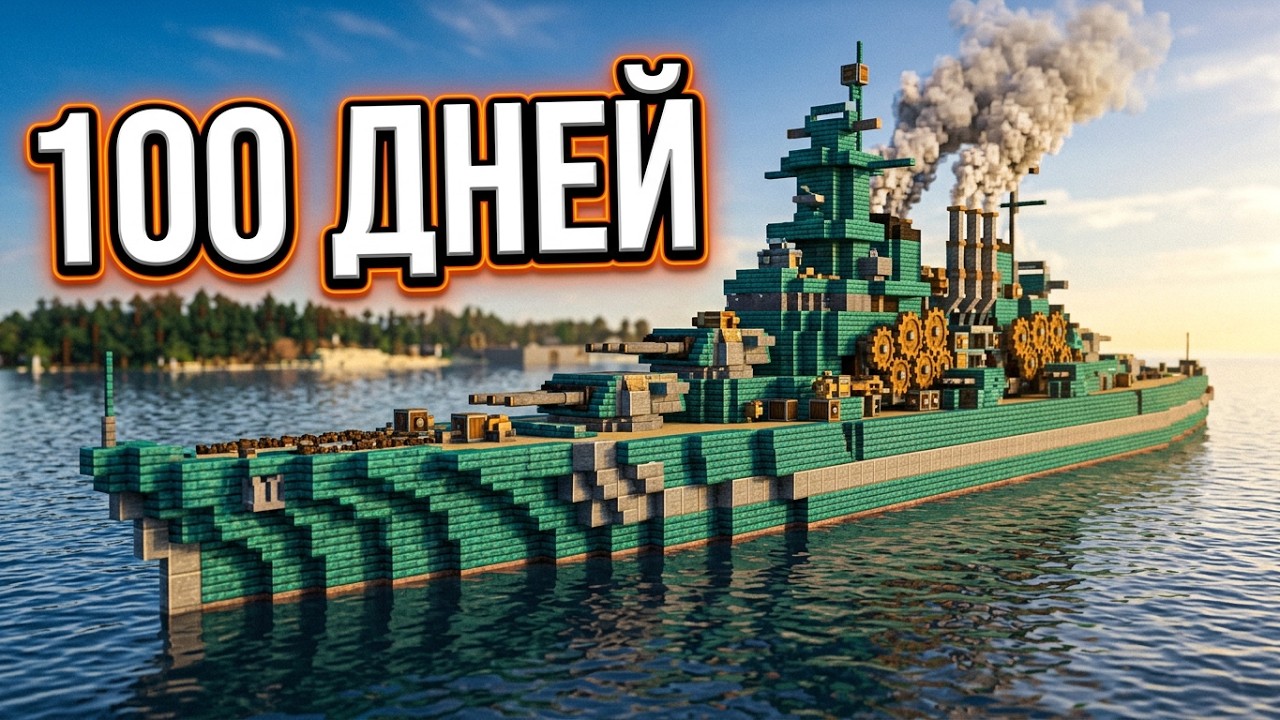
In the second part the team launches a warship — that episode is already built into the start of this guide. The third one, honestly titled “It floated?!”, shows how the frame becomes a real vessel: it was glued together, fitted with propellers, a steering wheel and an engine, plus an analog gearbox. The author himself, who once tried writing mods, admits: making blocks keep their properties and gain their own hitbox is a nearly impossible task, and it clearly took a whole team of developers. Then came the classic seafarer’s story: fuel ran out in the middle of the ocean, the ship ran aground, and reverse thrust saved it. A pleasant discovery: the vessel banks into turns and catches timings like a real schooner, but doesn’t capsize even under harsh steering. Among the technical details worth remembering: a clutch that stops the movement without killing the engines, and precision mechanisms with an 80% chance — twice in a row they produced junk instead of the needed part. By the end of the part the ship was upgraded: twice as many propellers, and after an upgrade, reverse appeared.
The fourth part is dedicated to the giant crane — we break down its construction below, in the engineering projects section. And in the fifth episode, “The first airship”, the team steps on a rake first: for a day and a half they pumped oil until it turned out there simply was none in that chunk. By that time the port already had the Nazerak ship, controlled by a remote from the inventory, and a fully working crane for ships. Then — the long-awaited air adventure. Balloon envelopes are made from sheared wool, scissors and a copper jetpack come into play, and the first, most standard airship rises into the air. The tests are honest: not enough thrust, the steering system fails, the pilot is carried “into the stratosphere”, and after a failed maneuver the machine flips and slowly goes to the bottom. The second attempt goes better — with a diesel generator on board the machine is landed right on the water. Along the way you have to count fuel economy: gasoline feeds both the burner and the engine, so extra water wheels get switched off one by one. The finale of the episode is dramatic: a four-by-four drill to bedrock glitched on contact with water, the server crashed, and the world had to be rolled back to a backup.
The chronicle keeps growing: the team is still on the server, which means new parts and new machines are ahead. The full chronicle of all the parts lives on a separate page — it’s more convenient to watch the episodes in a row from there and follow how the machines evolve from the first troughs to airships. Fifteen days for the first factory, a hundred and fifty for the port with the crane, and next — the sky.
Why a stone ship doesn’t float
The naive beginner’s mistake is building transport out of stone because it’s “solid and pretty”. Physics is cruel: stone is roughly twice as heavy as air and water for these purposes, and a massive stone vessel simply goes to the bottom or never leaves the ground. Survival experience shows: floating and flying structures need a light material. Warped and crimson planks — nether wood — come to the rescue. They’re as light as ordinary oak, and they don’t catch fire, which matters near lava and flames. Along the way it’s a reason to visit the Nether for a fortress and blaze arrows: the Create burner needs blaze rods, and without it some mechanisms won’t run.
The warship, the crane and the “ordinary plane”: engineering projects
The warship from the second part is the series’ most telling engineering project. This is where the mistake from the headline above costs the most: physics honestly sinks a stone hull, so the vessel is built from light nether wood with the weight distributed in advance. Then — shaft mechanics: propellers get rotation from the engine, an analog gearbox switches modes, a clutch stops the movement without shutting down the motors, and reverse engages backward thrust when you need to get off a sandbar. On board, the crew loads double chests with resources: a ship in Create is first of all a truck for crossing oceans.
The crane made of industrial iron is a harder project, and it wasn’t built for beauty: first they picked the location for the port, and built the loading mechanics to fit it. Even the pilings took a whole stack of blocks, and on top they installed water wheels and a separate power source for the winch. The controls are built on the familiar pair: clutch and reverse switch the crane between rotating the arm, lifting and lowering the load. In the end the author judged the speed sufficient for winch work — a useful lesson: in Create you don’t always need maximum power, sometimes the minimum is enough, and the construction stops catching overloads.
A separate episode, “Just an ordinary plane in Minecraft (not ordinary)”, takes the line to propeller machines. The episode shows the team prepared for the plane in advance: in the fifth part they discuss the classic single-propeller scheme, the flaps — the hardest part of the structure, a diesel engine instead of a weak one, and a chain drive in the hull to start several motors at once. The catch is in the title: an “ordinary” plane in Create turns out to be a warship-level project — get the weight distribution or thrust wrong, and the machine never leaves the ground. We put the engineering details of the ship and the crane into a separate ship and crane breakdown.
Super glue and the “glue in sections” rule
For a set of blocks to become a single whole with physics, the structure is glued with super glue — it’s brewed from slime dye. There’s an important nuance everyone trips over: the glue area is limited. Trying to “grab” a huge frame at once runs into a message saying the selected area is too big. So a ship or an airship is assembled and glued in sections, checking each one separately — otherwise you’ll find out too late that it’s not the superstructure that sinks, but the whole frame.
How to install the mod without the fuss
Technically the installation is standard for a modpack: you need a loaded Forge or Fabric (check version support on the mod’s page), then the mod file goes into the mods folder, and the game launches through the profile of the right version. The difference between a modpack and a single client is the launcher core; for more on choosing a launcher and safe installation, read our servers and setup section. If you’re going to play not alone but with a team on a shared world, it makes sense to raise a separate core — then Create’s physics won’t lag for each participant. Reviews of other mods are collected in the “Mods” section.
How to spend the first hundred days
The “100 days of survival” format is popular for a reason: it forces you to develop an economy, not just fly one plane around. A practical route for the start — an iron factory, water wheels for energy, brass processing and sorting, a light fleet of nether wood, and only then — the big warship. That way, by day one hundred you don’t have a pile of blocks, you have a working fleet.
The bottom line: Create Aeronautics is not a “cheaty jetpack” but a big engineering line, where every machine is a task about weight, materials and automation. This guide gathers it in full: how the mod works, resources for the start, the five-part “100 days” chronicle and separate projects from the warship to the “ordinary” plane. Start with light planks, don’t skimp on time for brass, and glue in sections — and your first machine will take off the same evening. The “100 days” series continues: new parts and new machines are on the way, and this guide will be updated as they come out.
Install the mod only on a compatible version: Create is strictly tied to the core (Forge/Fabric) and to the major game version, and a version mismatch gives you an empty block list at launch. Keep a separate build for experiments, so you don’t break your main survival world.
On safety: take the mod file only from a trusted source or build, not the first ad button on the download page. After installing, it’s worth scanning the mods folder with an antivirus once — Java mods are harmless, but fake twin sites mix in extra stuff.
On performance: transport physics and Create automation eat TPS. If the server is meant for a team, raise the core with memory to spare and don’t launch dozens of flying machines in one chunk area.